What others lose, we preserve.
HubSpot to Copper migration — committing to Gmail.
Copper's Gmail-first model is what HubSpot Sales Hub keeps trying to be. If your team lives in Gmail, the switch is overdue. We migrate Contacts, Companies, and Engagements with Gmail-validated emails.
No signup. No credit card. Drop a file, watch the AI map it in 60 seconds.
HubSpot logs every email exchange as a Contact record. Copper rejects bounce-prone imports.
Pre-flight validates every HubSpot contact email against deliverability rules — clean data goes to Copper, dirty data gets archived for you to review.
Or skip the move entirely — SalesCrunchCRM is the ACT! you remember, modernized. Migration is free.
Want to see what happens after "upload"? See the full 9-step walkthrough →
Step 0 — before you upload
How to get your data out of HubSpot
Two minutes, no IT department required. Here's exactly where the export button hides.
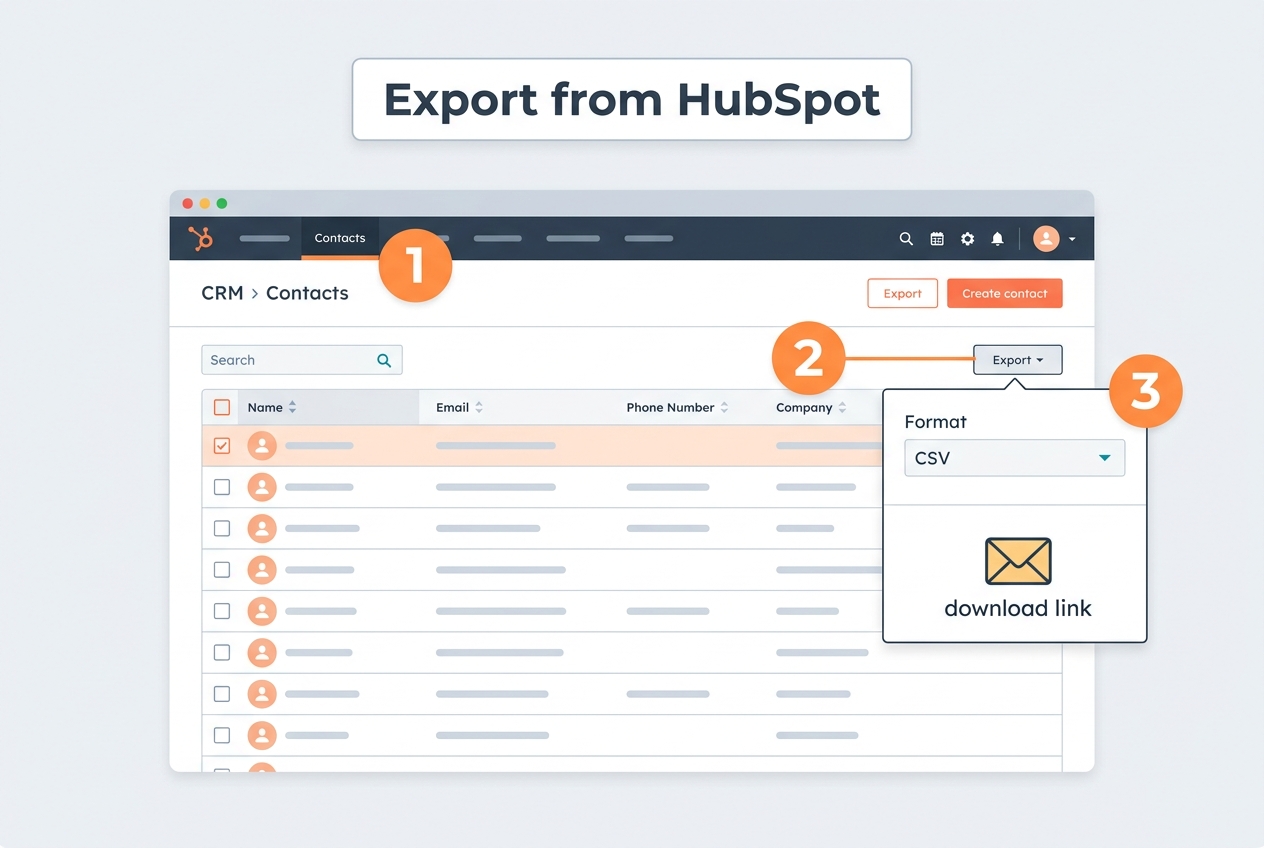
- 1Log in → top menu CRM → Contacts.
- 2Above the contact table, click "Export" (on some plans it hides under the ⋯ More menu).
- 3Pick file format CSV and "All properties", then confirm.
- 4HubSpot emails you a download link — click it and save the CSV.
What you'll end up with: A CSV, delivered as an emailed download link.
Companies and Deals export the exact same way from CRM → Companies and CRM → Deals.
90-second demo
Watch a real 8,500-contact migration
A messy financial-advisor export goes in. The AI reads the notes, maps every field, flags the duplicates, and a clean file comes out — free when your destination is SalesCrunchCRM.
MigrationCrunch demo — 8,500 real contacts
Upload → AI mapping → duplicate check → clean download. Recorded on the actual product.
Vocabulary translation
HubSpot words → Copper words
HubSpot and Copper don't call the same things by the same names. What HubSpot calls a “Contact”, Copper calls a “Person”; “Company” becomes “Company”, and every “Deal” lands as a “Opportunity”. Our AI applies the full translation below automatically during field mapping — nothing to remap by hand.
CRM migration is supposed to be hard.
For 25 years, the same story: export your old database, lose half your data, hand-paste every note for three weeks. We fixed it.
😩 The old way
- • Export to CSV — half your fields don't map
- • Notes either don't come, or attach to the wrong contact
- • Pay a "consultant" $1,500-$5,000
- • Spend 3 weeks copy-pasting
- • Give up and lose 20 years of history
✨ MigrationCrunch
- • Upload any CRM export, AI maps fields in 5 seconds
- • AI matches notes to the right contact by name/company
- • From $599 one-time — not $1,500-$5,000
- • 10 minutes start to finish
- • Keep all your relationship history
Smart. Fast. Affordable.
AI Field Mapper
Even Portuguese, German, or wonky column names — our AI figures out what's a phone, an email, an address. Confidence scores for every guess.
Note Matcher
Got a separate notes file? AI reads each note, finds the name/company inside, attaches it to the right contact. The thing nobody else does.
Pre-flight Check
Find duplicates, malformed emails, missing data before you import. No surprises.
Free · No signup · 30 seconds
Will your notes survive the migration?
Paste 2–5 of your real CRM notes below. Our AI shows you exactly what it would extract — the names, companies, emails, and phone numbers buried inside the prose. This is the data competitors lose. See for yourself before you pay anyone a dime.
Max 5 notes · Privacy: notes are NOT stored, only entity counts.
Same job. Simpler pricing. Faster finish.
Both charge by “records” — every note and email counts separately. Read the plain-English breakdown before you pay anything.
1,000 contacts + history → ~15,000 records → $499-$999. Ours: $599 flat. Every note stays linked to the right contact.
Their $349 starter = < 12,500 RECORDS (~800 contacts). Their guided add-on: +$875, 1-2 weeks. Ours: $299 contacts-only or $599 with notes — flat, minutes.
Is MigrationCrunch right for me?
5 yes/no questions. 30 seconds. We'll tell you honestly if we're a great fit, a partial fit, or if you need a human consultant instead. No upsells, no BS.
Do the math yourself.
Slide the contact count to your number. We'll show what an agency charges, what a DIY tool plus cleanup labor costs, and what MigrationCrunch costs flat. No marketing math — just the actual prices.
Why we count contacts, not records
Import2, MigrateMyCRM, and Trujay charge you by records — every note, email, call log, task, and meeting counts as one. A typical contact carries about 15 recordsof history, so what looks like 10,000 contacts on your end is 150,000 records on their invoice (and a much bigger price tier). We charge by contacts. Move the slider by the number of people in your database — we’ll bring everything attached to each one along for the ride.
All three are priced for the same outcome — a clean, structured CRM where every phone number, email, and family detail from the old Notes column lands in proper fields. Sticker prices on DIY tools look lower because they skip the notes work; we add the labor cost back in below.
Agency
$1,500 base + ~$0.35/contact for notes cleanup
4–12 week turnaround
DIY tool + labor
Import2 / MigrateMyCRM / Trujay base + manual notes cleanup
Notes copied as text — fields not extracted
MigrationCrunch
Starter Pro tier · flat one-time
~15 min · ~99% accuracy on notes
You save vs the most expensive option
on 10,000 contacts — about 88% less than the next cheapest option.
And about 15 minutes instead of a month.
Patent-Pending AI Note Re-Association
Move the meaning, not just the text.
Competitors copy your note text but break the links between contacts and deals. We re-build the relationships inside your notes — so 20 years of sales history stays connected to the right people on the other side.
All tiers · One-time payment · No subscriptions · Minutes, not weeks · Secure Stripe checkout · Free AI Data Integrity Audit + Certificate on every migration
- ✓ AI field mapping
- ✓ Pre-flight check
- ✓ Generic CSV download
- ✓ AI Integrity Audit + Certificate
- — No AI note recovery
- ✓ Contacts + custom fields
- ✓ All 12 destination CRMs
- ✓ 30-day license
- — No notes / activity history
- — No AI note re-association
MigrateMyCRM: $349 · Import2: $499 base
- ✓ Everything in Contacts Only
- ✓ Notes + activity history
- ✓ AI Note Re-Association
- ✓ Email support
- ✓ 30-day money-back guarantee
Import2 charges up to $1,499 for the same size
- ✓ Everything in Starter Pro
- ✓ Priority email support
- ✓ Custom field mapping
- ✓ 60-day license
Cheaper than competitor base $999 + their $875 note-cleanup add-on
- ✓ Everything in Growth AI
- ✓ Custom destination included
- ✓ Dedicated Slack channel
- ✓ AI Migration Audit PDF
- ✓ 90-day license
Replaces competitor's $2,199+ "Custom Service" — but instant
- ✓ Everything in Enterprise AI
- ✓ White-glove fulfillment
- ✓ Dedicated migration engineer
- ✓ 180-day license
- ✓ Prevents $20k+ manual repair
✓ Concierge included — we run it for you, no add-on needed. How it works
Flat fee prevents manual-cleanup costs at scale
Don't want to touch it at all? Check the “Add Concierge” box on any tier above and a migration specialist runs the whole thing with you on a scheduled call — export, mapping, preflight, spot-check, signed audit certificate. Your old CRM is never touched; we only read exports.
One flat price on top of your tier — no per-record charges: +$500 on Contacts Only & Starter Pro · +$750 on Growth AI · +$1,000 on Enterprise AI · included free with Unlimited AI.
Have a license key?
Secure checkout via Stripe · Receipt emailed instantly · License keys delivered immediately
Switching to SalesCrunchCRM? Migration is on us.
Any contact count. Any notes file. The full patent-pending AI Note Re-Association — free. We make it back on the $30/user/mo subscription. SalesCrunchCRM is the ACT! you remember, modernized — built for refugees who don't want to relearn a CRM. See SalesCrunchCRM →
Related migrations
Same patent-pending AI note recovery — pre-configured for these other combos.
Other migrations from HubSpot
Other migrations to Copper